
Help › Expenses and fuel
Expenses and fuel
Snap a photo of each receipt when you buy something for the business. At tax time, every expense is filed by category with its receipt attached, and your fuel is ready for a refund claim.
1. Add an expense
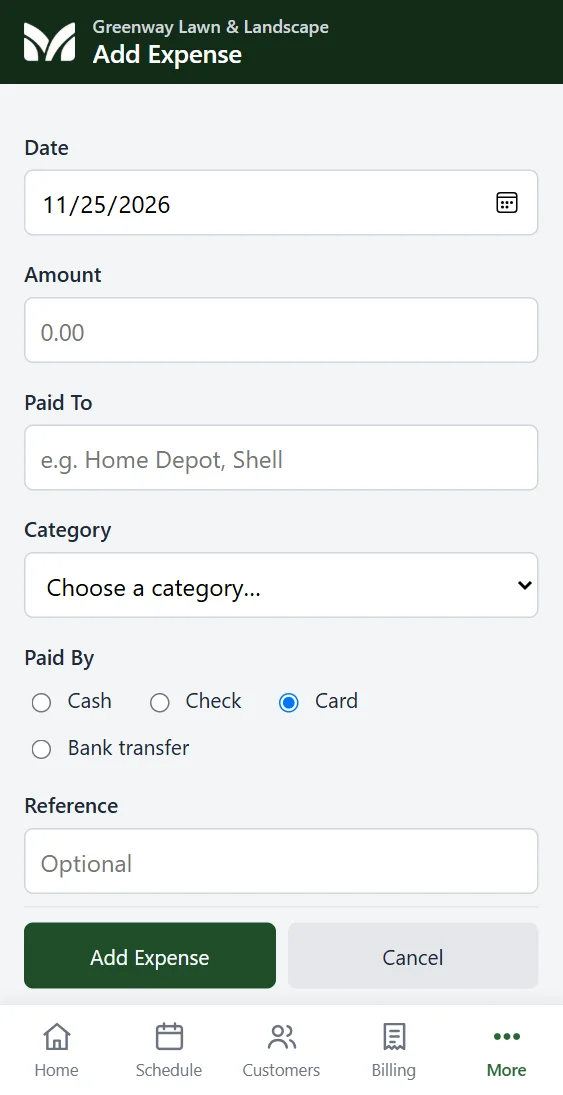
Expenses › Add Expense
- Enter the date, the amount, and who you paid, like “Home Depot” or “Shell”.
- Pick a category.
- Pick how you paid: cash, check, card or bank transfer. Add a check number or other reference if it helps.
- Add the receipt. On a phone, this can open the camera, so you can take the photo right at the counter. A PDF works too, for receipts that come by email.
- Press Add Expense.
A receipt is required for every expense, so nothing goes in without its proof. Photos are turned the right way up and shrunk to a sensible size, and they’re stored safely online.
Put + Expense in your phone’s bottom menu, under Settings › Bottom Menu, and adding a receipt takes two taps.
2. Fuel
When you pick the Fuel category, three more boxes appear:
- Fuel type: gasoline or diesel.
- Used for: on-road for your trucks, or off-road for mowers, blowers and other equipment that isn’t driven on public roads.
- Gallons: MowBill works out the price per gallon for you.
Keep off-road fuel separate from on-road fuel. Fuel burned off the road can qualify for a fuel tax refund, and these are the records you’ll need. Ask your accountant what applies to you.
3. Categories
Settings › Expense Categories
MowBill starts you with common ones: Fuel, Equipment, Repairs & Maintenance, Supplies, Payroll, Insurance, Vehicle, Dump Fees, Office and Other. Add your own, rename them, or turn off the ones you don’t use. You can mark any category as fuel, so it gets the fuel boxes.
4. Find an expense or receipt
The Expenses list can be searched by who you paid, memo or check number, and filtered by date, category and how you paid. Open an expense to see its receipt, or to change it.
Online payments can add their Stripe fees as expenses automatically. See Getting paid.
5. Expense and fuel reports
Reports › Expenses, and Reports › Fuel
- Expenses: a period’s expenses, totaled by category, with each category’s share.
- Fuel: gallons and cost by fuel type, on-road and off-road, plus a list of every off-road purchase. Pick a quarter or a year to match your refund claim.
Reports are for Admin users. More in Reports.
Next: Equipment